> ## Documentation Index
> Fetch the complete documentation index at: https://docs.hazel.ai/llms.txt
> Use this file to discover all available pages before exploring further.
# Google
Connect your Google account to give Hazel access to your calendar events, emails, and the ability to draft responses to your contacts.
Hazel does not send email on your behalf. Every email draft that Hazel creates requires a human in the loop to review prior to sending
***
### **Email**
Hazel provides pre-drafted responses for emails that are received from contacts in your CRM. Hazel also uses these emails as context to help you prepare for meetings or leverage in Ask Hazel.
### Calendar
Hazel views your calendar and automatically scheduled note takers to join. Hazel reviews past and future events and provides you with agendas for each event.
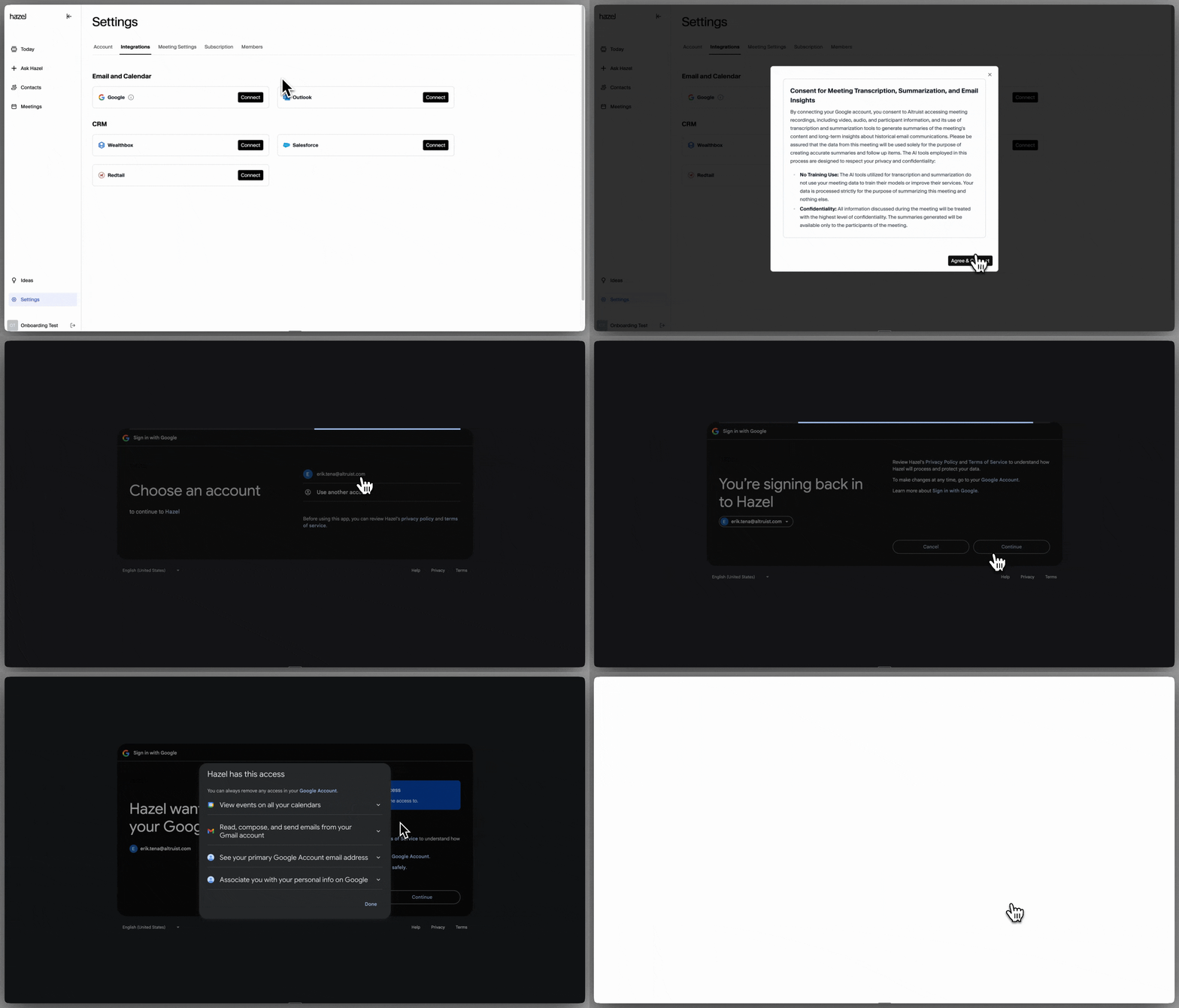 ### Permissions to review and accept:
* View events on all your calendars
* Read, compose, and send emails from your Google account
* See your primary Google Account email address
* Associate you with your personal info on Google
Have questions about the Google integration? Reach out to [support@hazel.ai](mailto:support@hazel.ai) for more information.
### Permissions to review and accept:
* View events on all your calendars
* Read, compose, and send emails from your Google account
* See your primary Google Account email address
* Associate you with your personal info on Google
Have questions about the Google integration? Reach out to [support@hazel.ai](mailto:support@hazel.ai) for more information.