> ## Documentation Index
> Fetch the complete documentation index at: https://docs.hazel.ai/llms.txt
> Use this file to discover all available pages before exploring further.
# FAQ
### Ask Hazel FAQ
Simply click on the plus icon within the Ask Hazel search bar, type in your prompt, and press enter! Hazel will analyze the file and provide you with a response.
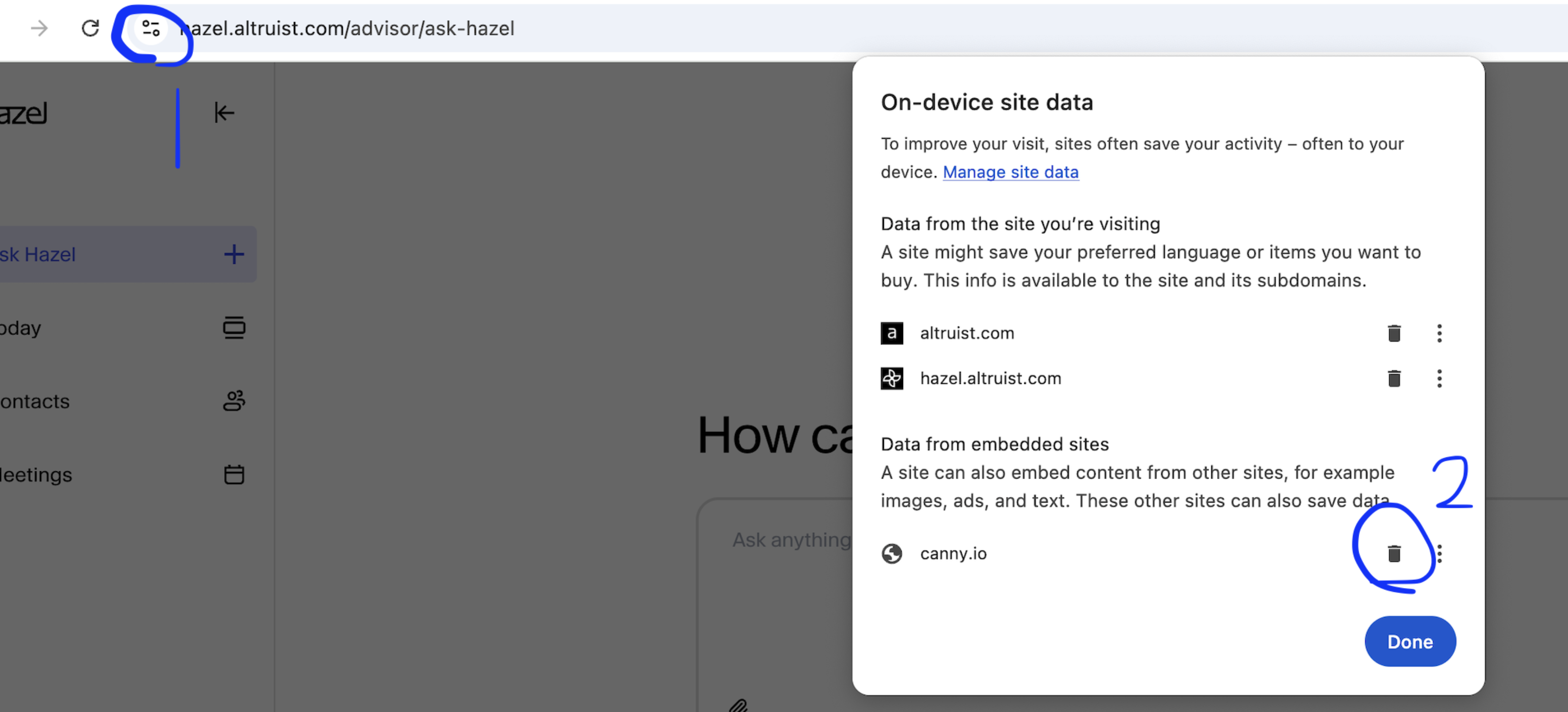
The Ideas page is how we track feedback, through Canny's feedback portal. If it is not working, try clearing your cookies/data on the Hazel page for the Canny connection. Then try again by refreshing and re-clicking the Ideas button within Hazel.
 No, you cannot edit your Altruist data within Hazel. Hazel has read-only access to your custodial data in Altruist.
In chat, no. Chat only relies on individual account data, meaning you have to connect to your Altruist account connected to view any custodial data.
In meeting agendas, perhaps. Meeting prep and agendas rely on the calendar event owner's Altruist connection, so your Altruist account data could be shared if other Hazel team members in your firm have access to the same meeting via the household participant permission. More on household permissions here.
### Meetings FAQ
No, you cannot edit your Altruist data within Hazel. Hazel has read-only access to your custodial data in Altruist.
In chat, no. Chat only relies on individual account data, meaning you have to connect to your Altruist account connected to view any custodial data.
In meeting agendas, perhaps. Meeting prep and agendas rely on the calendar event owner's Altruist connection, so your Altruist account data could be shared if other Hazel team members in your firm have access to the same meeting via the household participant permission. More on household permissions here.
### Meetings FAQ
 To edit speaker labels in a Meeting transcript:
1. Open the Transcript tab in the Meeting you would like to update.
2. Click on the name of a Speaker label. You will be presented with the option to:
* Rename Manually
* Rename as Client
* Swap Labels
3. Click Save
### Email FAQ
On the follow up emails, you can tweak the prompt and give Hazel instructions and example quotes of things you'd likely say. By instructing Hazel in the prompt, you can set rules for tones to follow.
On the the email assistant that auto drafts inbound emails, you cannot set rules or give Hazel instructions on how to formulate emails.
Yes, you can edit the screening criteria and adjust the prompt Hazel uses to filter inbound emails within Settings / Account / Email Preferences.
### Altruist Integation FAQ
No. Hazel has read-only access to your custodial data in Altruist.
In chat, no. Chat only relies on individual account data, meaning you have to connect to your Altruist account to view any custodial data.
In meeting agendas, perhaps. Meeting prep and agendas rely on the calendar event owner's altruist connection, so your Altruist account data could be shared if other Hazel team members in your firm have access to the same meeting via the household participant permission. [More on household permissions here.](/guides/settings/members/roles-and-permissions)
We can only pull contacts from your CRM at this time, not Altruist.
The Altruist integration is completely separate from contacts. Meaning if you go into chat today and ask it for custodial data, it would fetch the appropriate Altruist contact and the relevant details.
### Billing FAQ
Each firm has one free trial period. It’s advised that all users in the firm test Hazel through that free trial. Reach out to [support@hazel.ai](mailto:support@hazel.ai) if you have any questions on your free trial.
Each firm has one free 14 day trial period.
All users are billed on the 1st of the month in which their subscription is due.
Monthly users are billed on the 1st of the month, each month they are subscribed.
Annual users are billed on the 1st of the month after their annual subscription is due.
You can update your payment method in by editing the existing Hazel subscription in Settings → Subscriptions.
Only Owners can invite new members and manage roles.
Hazel charges will appear on your statement as `ALTRUIST HAZEL.AI`.
Reach out to [support@hazel.ai](mailto:support@hazel.ai) if you would like to download past invoices. We can also help your firm enroll in automatic invoices for future charges.
Yes. Reach out to [support@hazel.ai](mailto:support@hazel.ai) to enroll in automatic invoices.
To edit speaker labels in a Meeting transcript:
1. Open the Transcript tab in the Meeting you would like to update.
2. Click on the name of a Speaker label. You will be presented with the option to:
* Rename Manually
* Rename as Client
* Swap Labels
3. Click Save
### Email FAQ
On the follow up emails, you can tweak the prompt and give Hazel instructions and example quotes of things you'd likely say. By instructing Hazel in the prompt, you can set rules for tones to follow.
On the the email assistant that auto drafts inbound emails, you cannot set rules or give Hazel instructions on how to formulate emails.
Yes, you can edit the screening criteria and adjust the prompt Hazel uses to filter inbound emails within Settings / Account / Email Preferences.
### Altruist Integation FAQ
No. Hazel has read-only access to your custodial data in Altruist.
In chat, no. Chat only relies on individual account data, meaning you have to connect to your Altruist account to view any custodial data.
In meeting agendas, perhaps. Meeting prep and agendas rely on the calendar event owner's altruist connection, so your Altruist account data could be shared if other Hazel team members in your firm have access to the same meeting via the household participant permission. [More on household permissions here.](/guides/settings/members/roles-and-permissions)
We can only pull contacts from your CRM at this time, not Altruist.
The Altruist integration is completely separate from contacts. Meaning if you go into chat today and ask it for custodial data, it would fetch the appropriate Altruist contact and the relevant details.
### Billing FAQ
Each firm has one free trial period. It’s advised that all users in the firm test Hazel through that free trial. Reach out to [support@hazel.ai](mailto:support@hazel.ai) if you have any questions on your free trial.
Each firm has one free 14 day trial period.
All users are billed on the 1st of the month in which their subscription is due.
Monthly users are billed on the 1st of the month, each month they are subscribed.
Annual users are billed on the 1st of the month after their annual subscription is due.
You can update your payment method in by editing the existing Hazel subscription in Settings → Subscriptions.
Only Owners can invite new members and manage roles.
Hazel charges will appear on your statement as `ALTRUIST HAZEL.AI`.
Reach out to [support@hazel.ai](mailto:support@hazel.ai) if you would like to download past invoices. We can also help your firm enroll in automatic invoices for future charges.
Yes. Reach out to [support@hazel.ai](mailto:support@hazel.ai) to enroll in automatic invoices.